AI speaking practice for iPhone
Studied a language but freeze when you speak? Talk your way through Capy Town.
Order a drink, ask for directions, check in to a hotel. You get each errand done by speaking with a town resident played by AI. When you slip, the wrong part turns into a block and you swap in the right one. It's an AI on the other side, so try as many times as you like.
Coming soon to the App Store
- One-time purchase
- No account needed
- AI conversations need a connection
iPhone, iOS 17 or later. The App Store shows the current price for your region.

Your first turn
Say one line. The wrong block is swapped on the spot.
This is the first lesson in Café Market, practised here in Japanese with notes in English. Near the end, the fox barista asks whether it's for here or to go.


GoalsFox the barista
- Order a drink (done)
- Say which size you want (done)
- Say for here or to go (done)
Fox the baristaLサイズですね。店内で召し上がりますか、それともお持ち帰りですか。Translation: Large, got it. Will you have it here, or take it away?
You saidここに飲みます。
ここYou said にchanged to で飲みます。
Use で to indicate the location where an action takes place.
Fox the baristaはい、かしこまりました。店内でLサイズのアイスコーヒーですね。少々お待ちください。Translation: Certainly. One large iced coffee for here. Just a moment, please.
- You do
- Say one line into your iPhone. You can type instead when you can't talk out loud.
- You see
- Your sentence split into blocks, the wrong block replaced by the right one, and a one-line note. The character keeps the conversation going.
- You keep
- The sentence comes back in the review step after the conversation, and it stays in your travel journal.
The character's lines, the correction and the note are the AI's actual output from a test conversation on 8 October 2026. The screen is redrawn from the app and the English translations were added for this page. This is an illustration, not an interactive trial.
How a lesson works
Every lesson is the same loop: repeat, speak, fix
-
 01
01
Repeat
Each lesson starts with the three phrases you'll need most in that scene. Listen, then say them out loud. The words that were heard correctly turn green.
What comes nextWhen the conversation starts, you already have three lines ready to use.
-
 02
02
Speak
The resident speaks first. A short list on screen shows the three things to get done, and each is ticked off as you manage it. Tap “Show translation” if you missed a line. If you're stuck, there are three levels of hints, and the last one lets you ask “How do I say…?” in your own language.
What comes nextA slip turns into blocks right under your sentence, with the right block swapped in.
-
 03
03
Fix
After the conversation, the corrected sentences come back one at a time. This time you put the right block in place yourself.
What comes nextThen you earn the stamp. The fixes from that session stay in your travel journal, which keeps your 200 most recent conversations, so you can look back or practise the same lesson again.
The question we hear most
Your voice stays on your iPhone. Only text is sent.
Speech recognition runs on the device, using the recogniser built into iPhone. Your audio is not uploaded, and the app does not save recordings.
So that the character can reply and your sentence can be checked, the recognised text is sent, with the last few lines of that conversation, to our server and from there to Google's Gemini. Our server does not store conversation content.
Stays on this iPhone
- Your voice (no recording is saved)
- Conversation history and fixes, for the 200 most recent conversations
- Progress, streaks and stickers
- The name or nickname you enter
Leaves your iPhone
- The text of each line you say, plus the recent lines of that conversation: to our server, then to Google Gemini
- The lesson, practice language and level, so the character knows which scene it is
- Apple's proof of purchase, to confirm you bought the app. Our server discards it after checking and keeps only a hash that can't be used to look up who you are; records such as usage counts are filed under that hash
Three limits to know about
Anything you say in a conversation, including your name, is sent as text. Text that reaches Google is not used to improve Google's products, but Google keeps it for a limited period to detect abuse. If your iPhone doesn't support on-device recognition for a language, the app asks you to type. It does not switch to uploading audio.
Real screens
One lesson, start to finish: “Order a drink” in Café Market
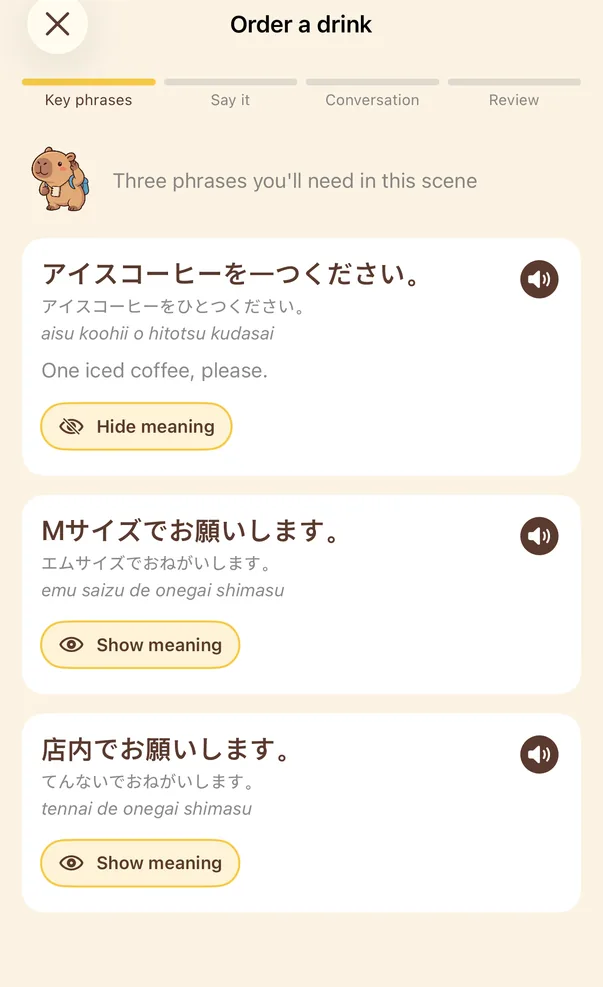
01Key phrasesListen to the three phrases this lesson leans on. Meanings stay hidden until you tap “Show meaning”. 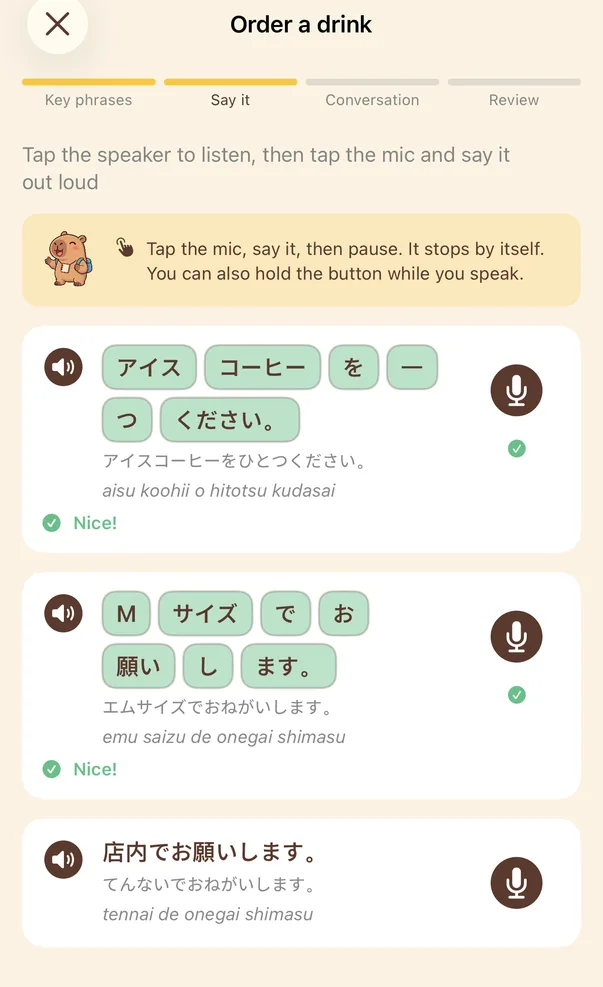
02Say itTap the mic and repeat each phrase. Words that were heard correctly turn green. 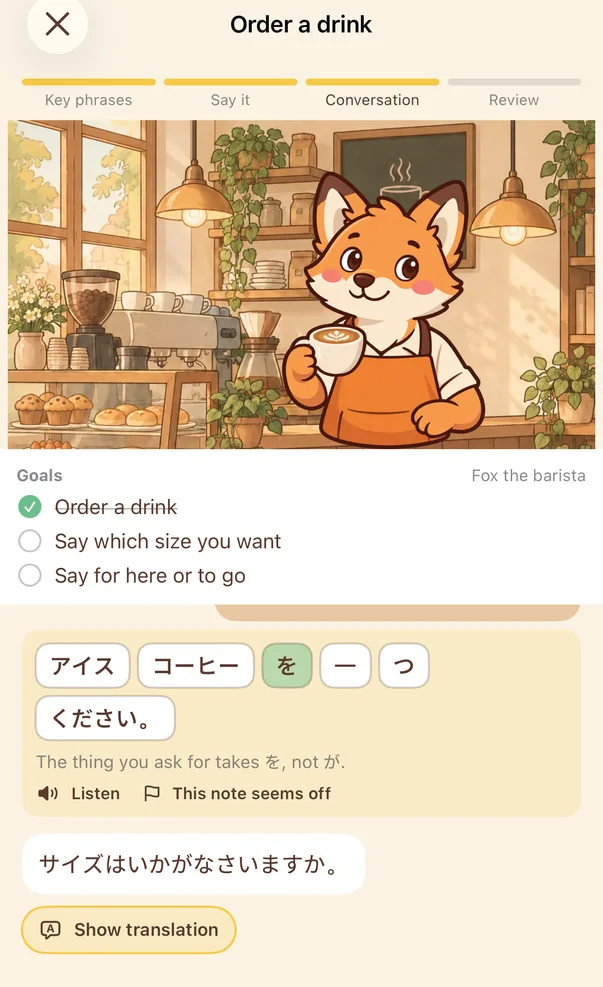
03ConversationA slip turns into blocks under your sentence: the wrong block is swapped for the right one, with a short note. The barista carries on. 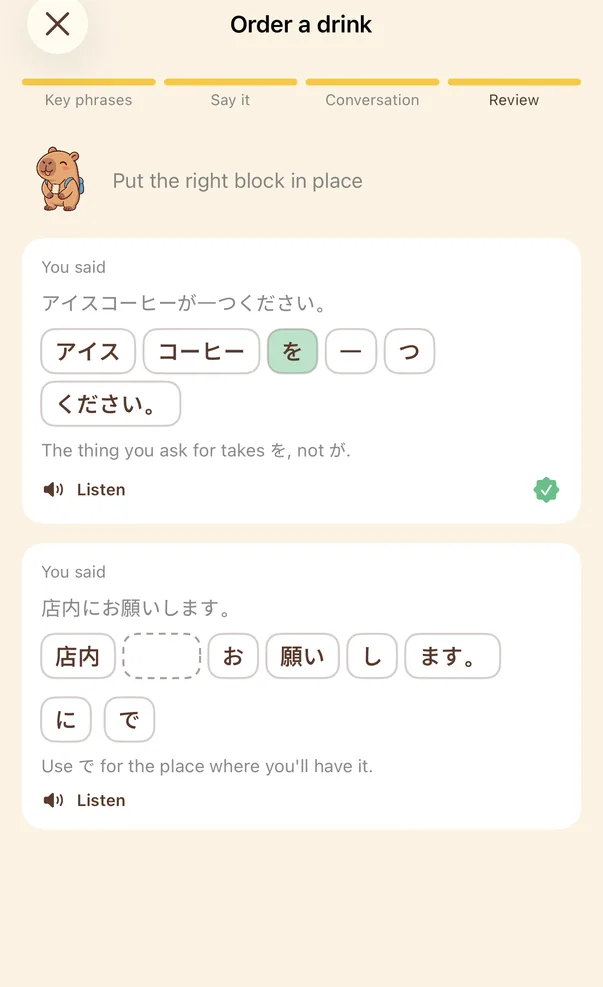
04ReviewAfter the conversation, the corrected sentences come back. Put the right block into the gap. 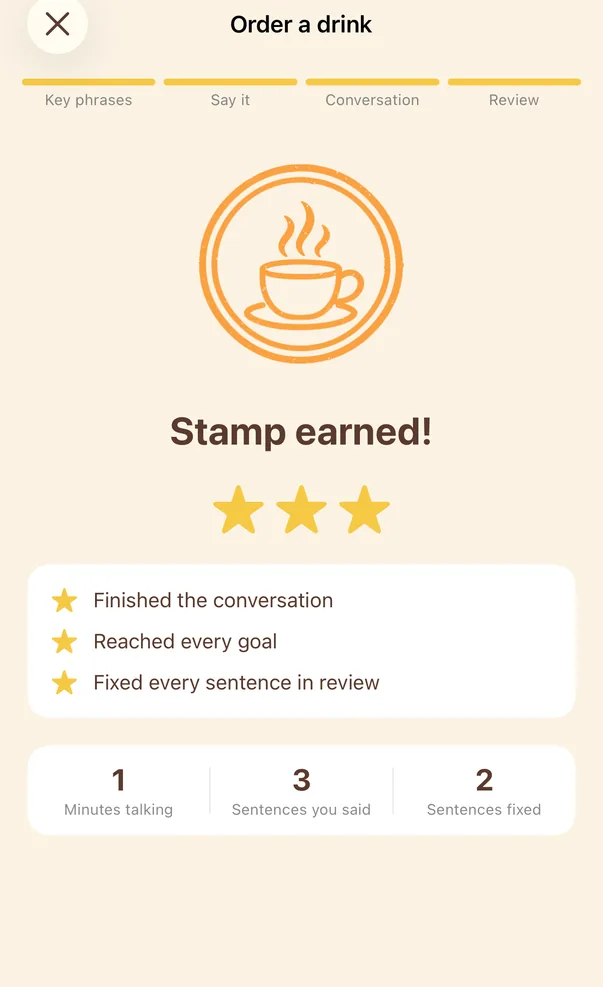
05StampOne star each for finishing the conversation, reaching every goal, and fixing every sentence in review. 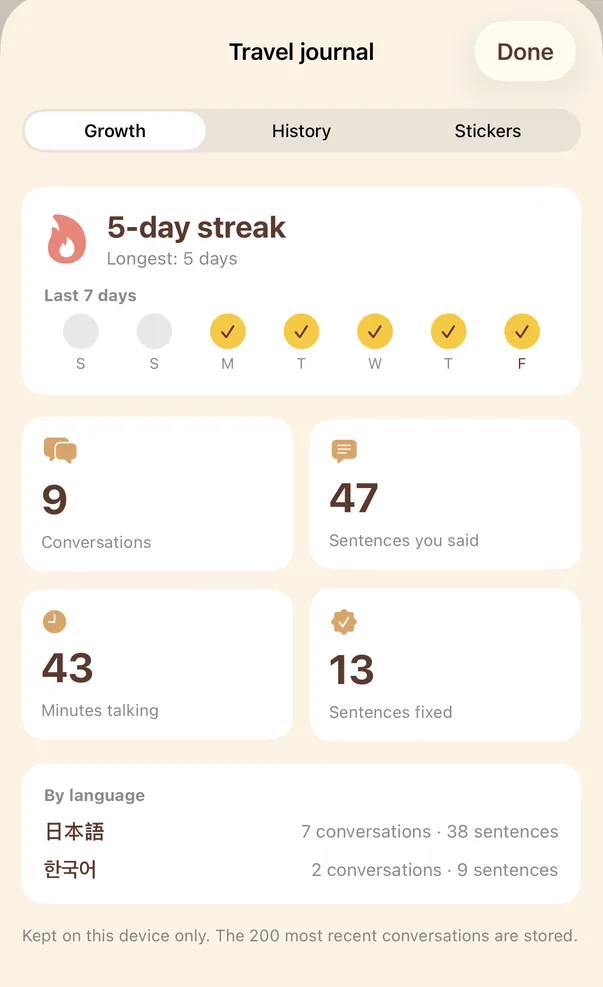
06Travel journalYour streak, the sentences you've said and the ones you've fixed are recorded here, and kept on this device only.
These are real screens from the CapyTalk test build (0.1.0), captured in October 2026. The conversation and the numbers shown are sample content. The released version may differ slightly.
What's supported
What you can practise, and what you need
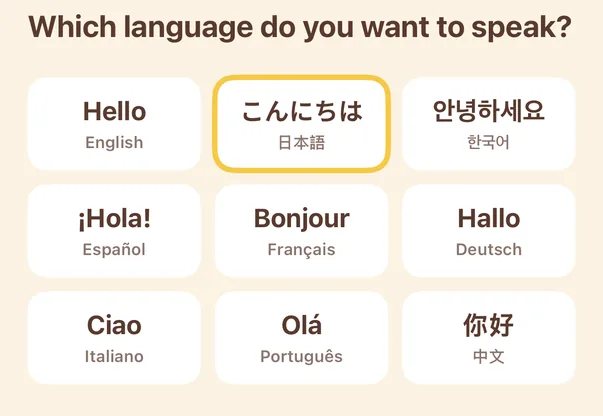
- Practice languages: 9
- English, 日本語, 한국어, Español (Latin American usage), Français, Deutsch, Italiano, Português (Brazilian usage), 中文 (Traditional characters, Taiwan usage). Every one has all 16 lessons and all 4 district challenges.
- Interface and explanation languages: 3
- 繁體中文, English, 日本語. Translations and correction notes appear in this language. If your iPhone is set to any other language, the interface is in English.
- Reading aid: 3
- Japanese (kana and romaji), Korean (romanisation), Chinese (pinyin). Shown under key phrases; you can turn it off in Settings.
- Voice input
- Uses iPhone's built-in, on-device speech recognition. Whether it's available depends on whether your iPhone and iOS version support on-device recognition for that language. If not, the app switches to keyboard input.
- Pronunciation scoring
- None. Repeating only checks whether the recognised words match; it does not grade your pronunciation.
- Character voices
- iPhone's system voices. More natural voices are a free download in iPhone Settings, and the app shows the steps.
- Needs a connection
- AI conversations, live corrections, translations, and “How do I say…?”.
- Conversation limits
- 60 turns a day and 600 a month. Details are in the FAQ below.
- Device
- iPhone, iOS 17 or later.
- Accounts and sync
- No account needed. Progress and history are stored on your iPhone; there is no sync between devices.
As of 8 October 2026 (test build 0.1.0).
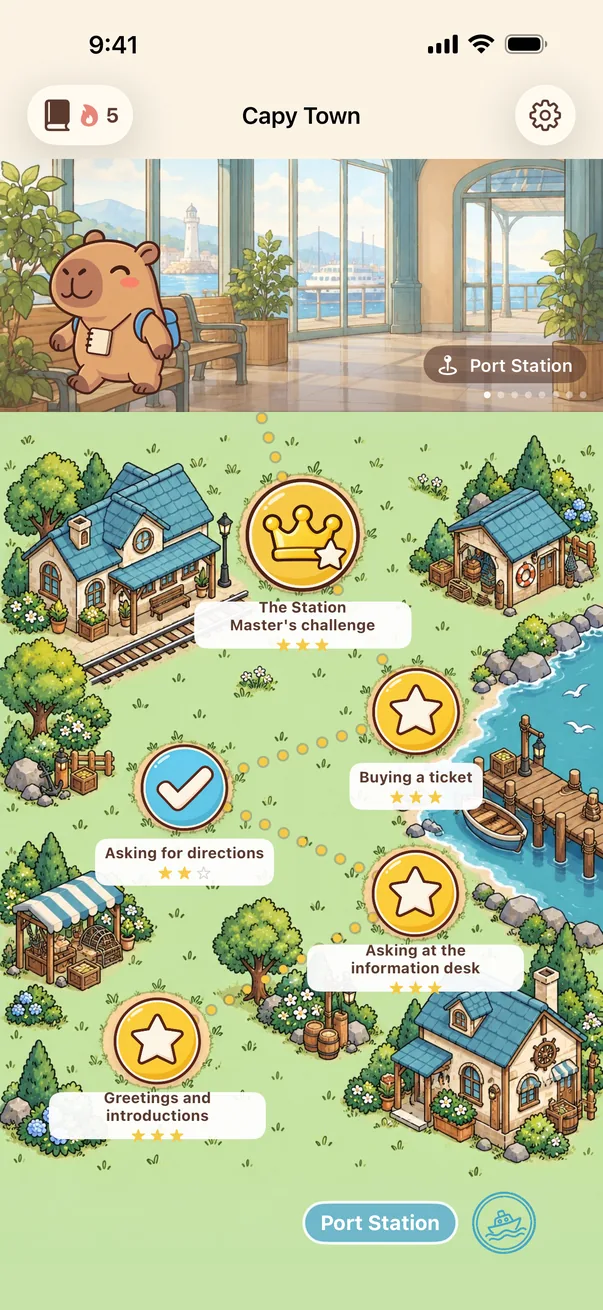
One town, 4 districts, 16 lessons, and a district challenge at the end of each
-
 Port Station
- Greetings and introductions
- Asking at the information desk
- Asking for directions
- Buying a ticket
- District challengeThe Station Master's challenge
-
 Café Market
- Order a drink
- Ordering a meal and dietary needs
- Asking about prices and sizes
- Paying, returns and exchanges
- District challengeThe Market Owner's challenge
-
 Hotel Street
- Checking in
- Facilities and requests
- Reporting a problem in the room
- Checking out and storing luggage
- District challengeThe Hotel Manager's challenge
-
 Festival Plaza
- Making a new friend
- Talking about hobbies
- Arranging to meet
- At the fan meeting
- District challengeThe Festival Host's challenge
Who's behind it
A team you can reach
CapyTalk is made by a team in Taiwan, the same team behind Capybara Korean.
The example sentences and scripted lines in the lessons were written and cross-checked by AI. They have not been reviewed by native-speaking teachers. Corrections and notes during a conversation are also generated by AI on the spot, so now and then a mistake is missed or a note is imprecise.
Support and contact
Questions, an unnatural sentence, an odd correction: email us. Including your iOS version and the app version (at the bottom of Settings in the app) helps us find the cause faster.
wupeiwen2001@gmail.com
Email the teamFAQ
Before you buy
Do I pay again after buying?
No. CapyTalk is a one-time purchase: you pay once on the App Store, and the app has no in-app purchases and no ads. Prices vary by region, and the App Store shows the current price for yours.
Do I need an account?
No. There is no sign-in and we never ask for your email address. The purchase goes through your Apple Account.
What works without an internet connection?
AI conversations, live corrections, translations and “How do I say…?” need a connection. Key phrases, repeating, review and the travel journal still work without one.
Is there a limit on AI conversations?
Yes. To keep a one-time purchase sustainable, conversations have a daily and a monthly limit: currently 60 turns a day and 600 a month. One line from you and one reply from the character is a turn; “How do I say…?” also counts as a turn.
Translations are counted separately, 150 a day, and don't use up turns. The daily limit resets at 00:00 UTC, and the app shows how many turns are left once you are down to the last 10 for the day. After you reach a limit, key phrases, repeating, review and the journal keep working. These numbers may change, and this page will be updated when they do.
Can a complete beginner use it?
You can start with the first lesson at Port Station: choose “Just starting” and the characters use very short sentences, and Japanese, Korean and Chinese come with a reading aid.
But CapyTalk doesn't teach alphabets, kana or grammar. It's practice for people who have studied a little and want to start speaking.
Are the AI's corrections always right?
No. Corrections and notes are generated by AI. It can miss a mistake, and a note can be imprecise. That's why, when nothing was changed, the app says “Nothing to fix here” rather than “Correct”. If a correction looks wrong, please email us.
Is there an iPad or Android version?
Right now CapyTalk is for iPhone only, on iOS 17 or later.
Can I get a refund?
Purchases and refunds are handled by Apple. You can request one at reportaproblem.apple.com.
What happens to my progress if I delete the app?
It's deleted. Progress and history are stored only on your iPhone. There is no account and no cloud sync.
Start with one “Hello” at Port Station
One-time purchase, no in-app purchases, no ads. iPhone, iOS 17 or later.
Coming soon to the App Store
Once CapyTalk is released, this will become a link to the App Store. The App Store shows the current price for your region.